Have you ever received an e-mail?
Silly question.
This is a story of digital deception, and how the Swiss national telecommunications provider delivers trivially spoofed e-mails straight to the inbox.
Definition
For the purposes of this article, a spoofed e-mail is an e-mail that appears to be coming from one address, ex: mybank@verylegit.com, but, in fact, is coming from another address, ex: hacker@veryevil.com.
While there are countless ways to trick recipients to take spoofed e-mails seriously by making addresses seem similar through alphabet variations or visual tricks, for example:
ceo@microsoft.com(m i c r o s o f t)ceo@rnicrosoft.com(r n i c r o s o f t)
We will here focus on the arguably technically more interesting spoofed kind of e-mails, those whose addresses have been forged exactly.
What is an e-mail
A good trick only works if it's believable. In our case, what looks like an e-mail is defined by RFC 5321 for SMTP, the simple mail transfer protocol, specifying transfer and delivery; and RFC 5322, specifying content. Worry not, the intricate details of these technical documents are not necessary to understand today's adventure.
Sending an e-mail
Sending an e-mail happens in a few steps, simplified here:
- Opening a TCP connection to the mail server
- Sending the envelope sender
- Sending the envelope recipient
- Sending the e-mail data (message headers and body)
After each step, the mail server accepts or rejects the data received. Below, an example of an e-mail from support@paypal.com announcing to admin@crashlo.gs that they have just gotten very rich.
+--------------------------------------------------------------+   ^
| TCP connection to recipient mail server                      |   |
| (source IP, destination IP, source/dest ports)               |   | Network
+--------------------------------------------------------------+   v

+--------------------------------------------------------------+   ^
| MAIL FROM:<support@paypal.com>                               |   |
| RCPT TO:<admin@crashlo.gs>                                   |   | SMTP envelope
+--------------------------------------------------------------+   v

+--------------------------------------------------------------+   ^
| From: <support@paypal.com>                                   |   |
| To: admin@crashlo.gs                                         |   |
| Subject: You are rich                                        |   | Message headers
| Date: ...                                                    |   |
+--------------------------------------------------------------+   v

+--------------------------------------------------------------+   ^
| You have just received a million $!!!                        |   |
| Click on this link to receive your money: >link<             |   | Message body
+--------------------------------------------------------------+   v
Is the e-mail above legitimate? How to be sure?
Anti-spoofing
E-mail comes from a time when protocols were built on trust. In principle, nothing prevents anyone from claiming to be anyone. Since then, however, a number of systems of defense have been widely adopted.
Defense 0: TCP
Not specific to e-mails, built into the network lies the first line of defense. Before two computers can exchange data, TCP introduces a three-way handshake:
- The sender sends SYN, "synchronize", starting a new connection with an initial sequence number.
- The receiver replies with SYN-ACK, acknowledging the receipt of said number and sending their own initial sequence number.
- The sender answers with ACK, confirming the receipt and completing the connection.
In plain English:
- Can we start?
- Yes, and I am ready too
- Confirmed
This prevents (trivial) lies about the source IP (the Internet postal address if you will). Indeed, while a normal TCP connection looks like this:
 Computer A                              Mail server B
  1.2.3.4                                  8.8.8.8
+---------+                              +---------+
| Sender  | -- SYN --------------------> | Server  |
+---------+                              +---------+
| IP:     | <------ SYN-ACK ------------ | IP:     |
| 1.2.3.4 | -- ACK --------------------> | 8.8.8.8 |
+---------+                              +---------+

Result:
Computer A receives the reply, so it can complete the handshake.
Lying about the source IP will result in this pattern:
  Computer A             Computer B                     Computer C
  real sender              server                     claimed sender
  1.2.3.4                  8.8.8.8                        1.3.3.7
+---------+              +---------+                    +---------+
| Attacker | -- SYN ----> | Server  |                    | Victim  |
+---------+              +---------+                    +---------+
| real IP: |              | IP:     | -- SYN-ACK -----> | IP:     |
| 1.2.3.4  |              | 8.8.8.8 |    to 1.3.3.7     | 1.3.3.7 |
| lies:    |              +---------+                    +---------+
| "I am    |
| 1.3.3.7" |
+---------+

Result:
- The server replies to 1.3.3.7, not to the attacker.
- The attacker does not receive the SYN-ACK.
- The attacker cannot send the correct ACK.
- The TCP connection does not complete.
Thus, defenses against spoofed e-mails can reasonably take for granted that the IP address that is sent to the mail server is the real one.
Defense 1: SPF
SPF, the Sender Policy framework, lets a domain owner publish which hosts are allowed to send mail for that domain. It is usually published as DNS TXT records (and thus can be looked up with dig TXT [domain]).
For example, Infomaniak (a Swiss web hosting company) shows this SPF record:
v=spf1 ip4:164.128.163.171 include:spf.infomaniak.ch -allWhich can be read as:
v=spf1identifies the versionip4:164.128.163.171authorizes that host to use the domaininfomaniak.chin the envelope sender.include:spf.infomaniak.chspecifies that the policies found atspf.infomaniak.chare also to be followed.-allmeans SPF returns fail for hosts not matched earlier.
-all is a hard-fail, an explicit statement that any sender not especially mentioned is not authorized. Other domains, for example paypal.com, prefer ~all which is a softfail, meaning that the host is "probably not authorized". ?all is a neutral statement and +all explicitly authorizes any sender.
A mail server can choose to honor SPF by checking if the incoming envelope sender, the incoming IP and the SPF record of the claimed domain of the envelope sender match, and refuse to deliver the e-mail in case they do not.
Defense 2: DKIM
DKIM, Domain Keys Identified Mail, is an e-mail authentication method whose details are not important for our adventure, which permits a receiving mail server to verify cryptographically that a message was signed by a domain taking responsibility for it, and that the signed parts of the message were not modified in transit.
Defense 3: DMARC
DMARC, Domain-based Message Authentication, Reporting and Conformance, uses the domain in the visible From: header as its primary identifier. It then checks whether either the SPF-authenticated domain or the DKIM signing domain aligns with that From domain. If at least one aligns, DMARC passes; otherwise, it fails.
What happens in case of failure can be published by domain owners in a DMARC record as DNS TXT under _dmarc.[domain] (and thus can be looked up with dig TXT _dmarc.[domain]).
For example, PayPal shows this policy:
v=DMARC1; p=reject; rua=mailto:d@rua.agari.com; ruf=mailto:d@ruf.agari.comWhich can be read as:
v=DMARC1is the versionp=rejectmeans the domain owner, here PayPal, wants the mail server to reject e-mails that fail the DMARC check.rua=mailto:d@rua.agari.commeans the domain owner would like to receive aggregate reports about authentication results atd@rua.agari.comruf=mailto:d@ruf.agari.commeans the domain owner would like to receive detailed reports about messages that fail DMARC atd@ruf.agari.com
Other policies include p=none which means no specific enforcement requested and p=quarantine which means that messages should be treated suspiciously, sent to spam or otherwise marked as unverified.
Summary
In the case of a spoofed e-mail, we have 4 actors:
- Sender/Attacker
- Mail server
- Receiver/Victim
- Impersonated domain
Conceptually, the verification can happen as follows:
- The sender first establishes a TCP connection with the mail server, reasonably proving its IP.
- The sender then sends their claimed envelope-from identity:
sender@domain.com - The mail server pulls the public DNS TXT records of
domain.com. - The mail server verifies whether the SPF policy of
domain.comallows the sender IP to claim that envelope-from identity. - The mail server then verifies whether and which parts of the message were cryptographically signed with DKIM.
- The mail server verifies whether the header-from domain aligns with the SPF-authenticated domain or with the DKIM signing domain.
- If the verifications pass, the e-mail is delivered to the receiver/victim, otherwise it is ideally treated as suggested by the DMARC policy.
Spoofing
This section discusses personal research conducted while following another rabbit hole entirely.
Two senders?!
Let us recall that an e-mail has two places to indicate the sender; the envelope-from, the one that is verified by SPF, and the header-from, the one that is subject to DMARC policies, and usually appears prominently in the UI.
Those do not necessarily have to match. It is possible to have the header-sender being mybank@verylegit.com while the envelope, "technical" sender is still evilhacker@verybad.com.
My e-mail provider (Bluewin) for example does not display the envelope-from, anywhere in its UI, nor does it warn when there is an important mismatch between the senders, leading to amusing results:
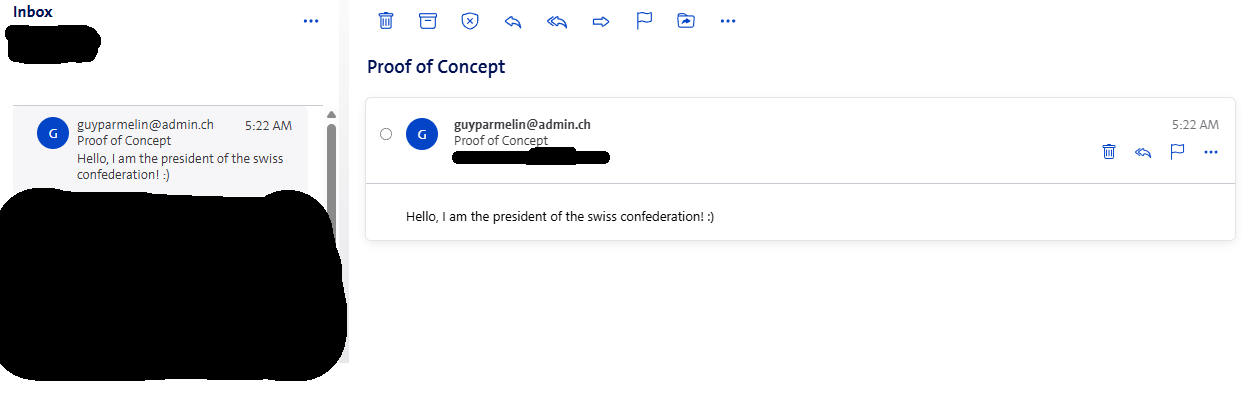
In this case, it is still possible to detect the spoof by inspecting the e-mail's source.
Where is my DMARC check?
But wait, didn't you write the from-sender was checked by DMARC? You would be wise to ask.
It turns out that the from-sender is not checked properly. Swisscom does not perform DMARC checks or does not judge the domain owner indicating that the e-mail should be rejected a sufficient indication not to deliver / put said e-mail in the spam folder.
E-mails with a forged address claiming to come from domains with an SPF soft-fail policy (~all) and a DMARC hard fail policy (p=reject) both in the envelope-from and the header-from are still delivered straight to the inbox by Bluewin with a noticeable spam-score of 0. Adding links, attachments does not change this evaluation.
In this case, the only way for a recipient to detect the forgery is by inspecting the e-mail's source and then manually checking whether the source IP indeed has permission to claim the identity of said domain. In my opinion, this is unreasonable to expect from the average user, especially when every single UI indication points at the forged address being the legitimate sender.
This policy combination is fairly common and arguably not a misconfiguration from the domain owner's part, as its adoption by serious companies (like paypal.com) and even companies owned by Swisscom (adapt-solutions.ch, jls.digital) seem to indicate. It is worth noting that Gmail, Outlook, etc. outright refuse to deliver such e-mails.
Bluewin
I have contacted Swisscom, the Swiss national telecommunication company, which operates Bluewin (with allegedly more than a million accounts (source)) about this issue. They have ultimately answered that "After discussion with the responsible team, it happen that it is a known and accepted risk. We will therefore close the report as won’t fix."
It is a risk to the user (and domain owners) after all, not really to Bluewin. Is it Swisscom's to accept or not? Unsatisfied with these conclusions, on the advice of relatives and out of curiosity, I contacted the Swiss National Cyber Security Center (source), which, besides being a reporting platform for cyber incidents in Switzerland and hosting a website full of warnings, reports, and guides against phishing, sometimes serves as an intermediary between security researchers and companies. In this case, they have concluded that Swisscom acknowledged that the reported behavior was an accepted/known risk, this does not mean it will never change, but it could indicate that at the moment this attack vector does not represent the main source of Spam and abuse and that other measures are also in place for Spam protection.
Given that fraud attempts, phishing and scams are made much more credible by convincingly spoofed e-mails, that the attack is trivial to conduct, that the consequences can be dramatic, that the remediation methods, while implemented in the largest providers (Gmail, Outlook, ...) as well as smaller actors seem here absent, I can only be disappointed by the response, especially coming from a public service company.
Remediation
On the provider side, ideally, widely adopted and tested solutions against spoofing are implemented properly. Moreover, a clear display of the envelope-sender in the UI can help to more easily detect frauds.
On the consumer side, it's probably good to be aware that even 100% legitimate-looking e-mails with a legitimate-looking sender address can be fake without either accounts being compromised.
Final words
It is my conviction that, due to the way most e-mail clients let us interact with e-mails, the "To" ("Cc", "Bcc", ...), "Subject", "Body" and "Attachment" parts of a message appear to be user-inputs while the rest is generally implicitly considered "system information" and thus, to be trusted.
This is not true. When it comes to e-mails, in practice, everything is a user-input, everything can be lied about. I can be PayPal support. I can be the CEO of Swisscom. I can be your lawyer. When sending e-mails to Bluewin users, I can be anyone. You can be anyone. Anyone can be everyone.
Certainly, a tech-savvy enough user, or one that is paranoid enough, will not fall for a maliciously spoofed e-mail. But shouldn't our systems of communication be designed to work safely also for those who spend time outside, for the receptionists who receive 300 e-mails a day and through the sleepless nights?
Safe systems always beat individual vigilance.
Testing your e-mail provider/server
Disclaimer
What follows is likely to breach the terms of use of your e-mail provider. In order to behave most responsibly, please
- Make it immediately and explicitly clear in your e-mail content/subject that it is a test
- Test with domains you own
- Send e-mails only to your own e-mail address
If you want to know whether you can trust your e-mail provider to discard or filter out e-mails spoofed using the techniques discussed in this article, it can go as follows:
0 - Setup
The guide below assumes a machine running on Linux with port 25 open and swaks, the Swiss Army Knife for SMTP installed (source). It is analogous on other OS. Port 25 is not always open on residential Wi-Fi but often is on VPS.
1 - Find the address of the mail server
dig [domain] MX +short

# Examples
dig bluewin.ch MX +short # if you have an @bluewin.ch address
dig gmail.com MX +short # if you have an @gmail.com address

# The output will look like:
# 5 gmail-smtp-in.l.google.com.
# 40 alt4.gmail-smtp-in.l.google.com.
# 20 alt2.gmail-smtp-in.l.google.com.
# 10 alt1.gmail-smtp-in.l.google.com.
# 30 alt3.gmail-smtp-in.l.google.com.
# Where the number means priority (lower --> more preferred)
2 - Save the mail server's address
MX="[Address found in step one]"

# Example: MX="gmail-smtp-in.l.google.com"
3 - Check for SPF/DKIM/DMARC enforcement
Set up the DNS records of a domain you control to the specific SPF / DKIM / DMARC policies you want to check against. Then, send the e-mail with:
# Replace the placeholders below before running.
# The last two lines are not always necessary
swaks --server "$MX" --port 25 \
  --to "[your-email-address]" \
  --from "[test@your-domain.example]" \
  --h-From "[test@your-domain.example]" \
  --h-Subject "Test: SPF softfail, DMARC reject" \
  --body $'Test message.\nExpected: SPF softfail (~all) and DMARC fail with p=reject.\n' \
  --tls \
  --timeout 30
4 - Check handling of envelope-header VS from-header
Similar to step 3, see here how the --h-From, the header-from VS the --from, the envelope-from, are displayed.
# Replace the placeholders below before running.
# The last two lines are not always necessary
swaks --server "$MX" --port 25 \
  --to "[your-email-address]" \
  --from "[test@your-domain.example]" \
  --h-From "[anything-you-want@example.net]" \
  --h-Subject "Test: header From display" \
  --body $'Test message.\nThis checks how the provider displays the header From versus the envelope sender.\n' \
  --tls \
  --timeout 30
References
- RFC 5321 — Simple Mail Transfer Protocol
- RFC 5322 — Internet Message Format
- RFC 7208 — Sender Policy Framework (SPF) for Authorizing Use of Domains in Email, Version 1
- RFC 6376 — DomainKeys Identified Mail (DKIM) Signatures
- RFC 7489 — Domain-based Message Authentication, Reporting, and Conformance (DMARC)